
Automations that run your Powerwall around your rates.
DemandGuard keeps your peak under the number that sets your demand charge. Simpler rules handle the rest: charge when power is cheap, warn you when the battery is low before peak, keep a floor for outages. Grid Getter checks your home every 60 seconds and acts on its own. Tell it your goals and it sets the rules up from your rate plan.
Thursday, 4:50pm. Your home wanted 6.2 kW. The grid saw 3.0.
Different automations for different jobs
Run your battery the way you want. Each automation is checked every 60 seconds and timed to your rate plan, and your goals decide which ones you need.
DemandGuard
Keeps grid use under a kW target through the peak window, checked every 60 seconds. SRP & APS pre-configured.
Cut my peak-rate costPeak Time
Runs the house on battery through peak, down to your floor. One rule per peak window, for every season.
Demand or peak-rate goalPre-Peak Charge
Fills the battery before peak, solar first, grid if solar falls short.
Keep backup · Protect batteryBattery Protection
Keeps charge between your limits. Your reserve becomes the floor.
Set up from your goals
You don't need to know what a demand floor or a reserve is. Say what you want, answer a question or two, and Grid Getter builds the automations from your rate plan and your battery. Not sure of your plan's details? Search by ZIP code and we fill them in from 3,700+ US utilities. You see every one before it's created, and you can change anything later.
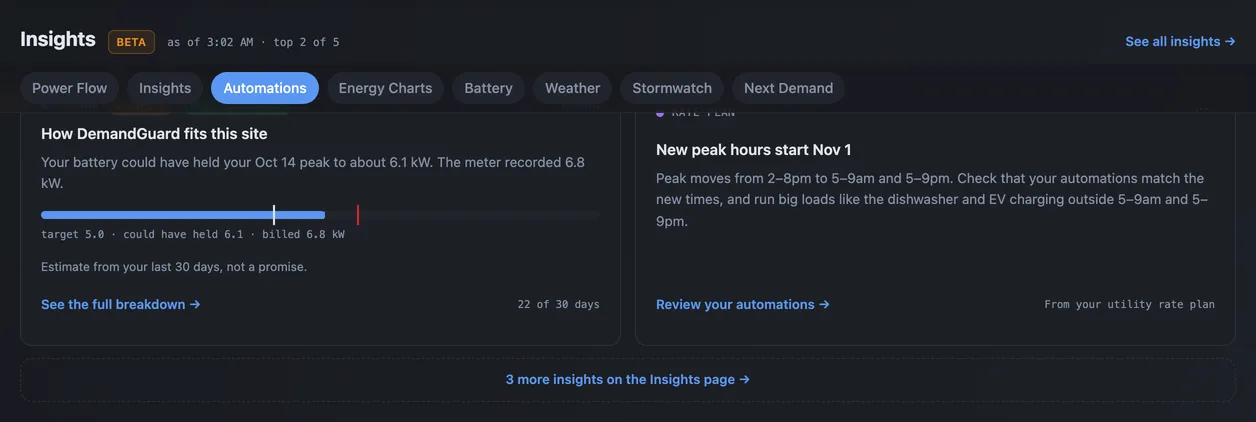
Each night it reads your last 30 days
In the morning you get short findings with the evidence behind them and a link to the setting.
- DemandYour battery starts DemandGuard at 64%
- BatteryYour battery started peak under half full
- SolarYou sold solar cheap and bought it back at peak
- Rate planNew peak hours start Nov 1
The demand charge is the fight worth picking
One bad half hour on SRP or one bad hour on APS can set your entire month's demand charge. We put together a dedicated Phoenix guide covering APS and SRP demand charges, billing windows, and what Grid Getter automates for Valley homes. Not sure your plan has a demand charge? Check by ZIP code.
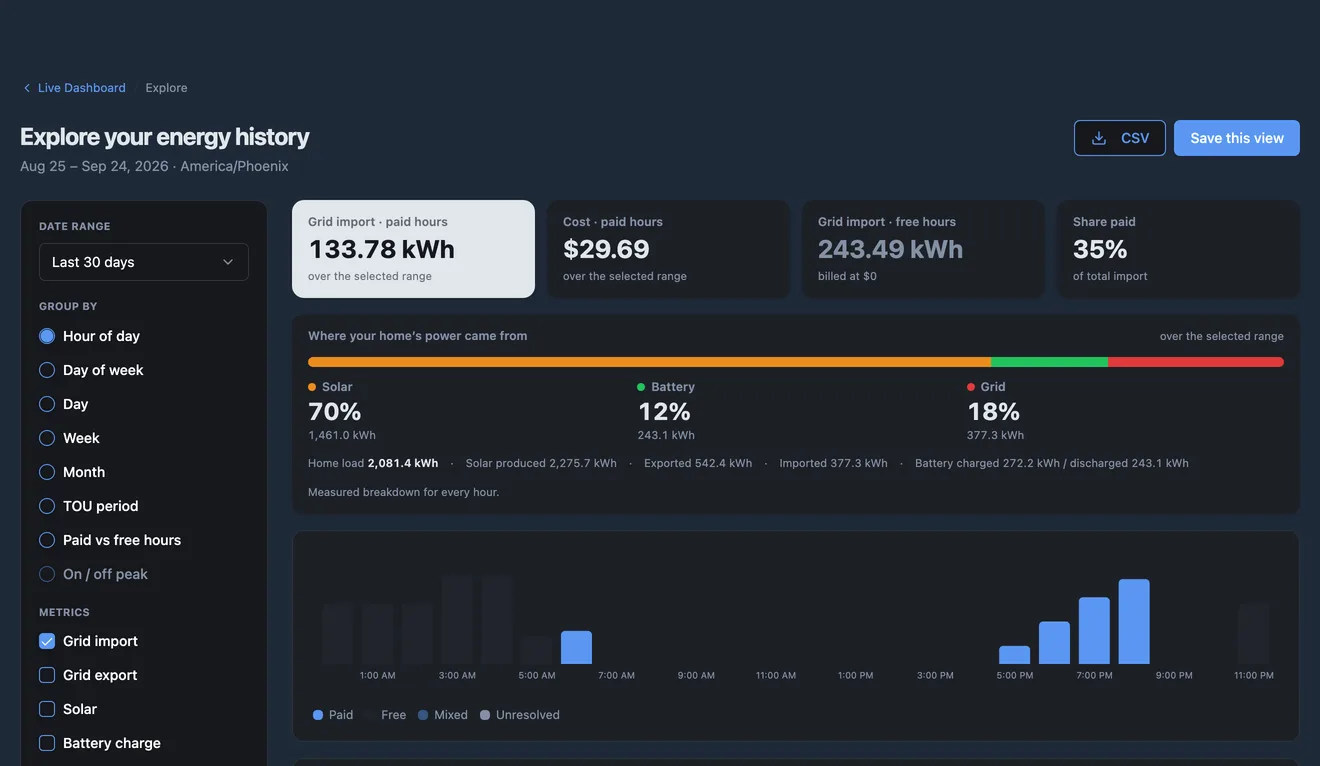
See which hours you actually paid for
Explore splits your history the way your bill does: paid hours and free hours, each rate period, and the hours your own automations run. It also shows what share of your home's power came from solar, the battery and the grid.
- History from before you signed up, filled in from Tesla
- Free Explore tab on every dashboard; full data builder in Scheduled
- Save views and export to CSV
Full at peak start, even on a cloudy day
Before each peak window, Pre-Peak Charge works out whether solar will get your battery to its target in time. It looks at your home's usual solar and usage, how today has gone so far, and the cloud forecast. If the sun will get there, it does nothing. If it won't, it charges from the grid during off-peak, as late as it safely can, and stops by the time peak starts.
- Charges only on the days solar falls short
- Schedule comes from your rate plan, so there are no hours to set
- A notification when a charge starts, with a Cancel button
- Works with your Peak Time or DemandGuard rule, on the Adaptive plan
Every peak you miss is money you already spent.
Right now your battery is following a schedule written by someone who's never seen your bill. A real peak-hour simulation: the line on the right is what your bill would look like if Grid Getter were already running.
* Based on SRP, APS, PG&E, and 11 more supported utilities' summer rate plans. Real August 2026 average savings: $64.25/mo.
Three steps, then it runs on its own.
Connect the Powerwall you already own, say what you want, and let the nightly check keep it honest.
Connect Tesla
Sign in with Tesla. We read your energy history and rate plan.
Pick goals, review automations
Say what you want. Check what we built before it's created.
Insights each night
We check the automations against your data and tell you what we found.
What else comes with it
Outage and offline alerts
A push and an email about ten minutes into a grid outage, and again when power comes back. You also hear if your Powerwall stops reporting.
All plansMonthly savings report
An email on the 2nd of each month with what your battery, solar and automations saved you. It includes a report card link you can share.
All plans with an energy planDisplay Mode
A full-screen, always-on view of live power flow and DemandGuard. Mount a tablet on the wall and leave it on.
ScheduledActivity log that explains itself
Every DemandGuard period with the power readings behind it, so you can see what your battery did and why.
AdaptiveGoal check on every rule
If a rule works against your goals, it says how: "Keeps 80% in reserve; you chose 20%." It never changes a rule for you.
All plansKnow why your battery did that
VPP exports and Tesla recalibrations look like something broke. Log one in a tap and it's labelled on your power graph for good.
All plansHold your charge
One tap keeps the battery at its current level for an outage. Or let your peak rules keep what's left every night instead of draining it.
All plansiPhone and Android apps
Your report, alerts and automations on your phone. Answer an alert right from the notification.
All plansWhat it costs, and what it saves
Monitoring and your first automation are free. On SRP and APS demand plans, DemandGuard customers saved an average of $64.25 a month on the demand charge in August 2026. Adaptive costs $10.99.
Demand charge savings measured from each home's own battery history at its own rates, for DemandGuard homes on SRP and APS demand plans in August 2026. Yours depend on your plan, your battery and how your home uses power.
Everything Powerwall owners ask us
What's in the free report?
You pick what you want your battery to do, connect Tesla read-only, and get a verdict on each goal from your own data: whether you're on track and where you're losing money. It reads your last 30 days, and for demand charges it goes back 12 months to find your biggest peak and what it cost. Our Tesla access is deleted after 24 hours and the report after 30 days, unless you keep it. More about the report →
What if I don't know my goal?
Pick "I'm not sure yet." Grid Getter starts from your rate plan: the demand charge if your plan has one, peak-rate cost if not. Run Smart Automations again any time to change your goals. How the goals work →
Can I change what it built?
Yes. They're normal automations. Edit or delete any of them, or run Smart Automations again with different goals. It compares its recommendations with the rules you have and never changes one for you.
What are Insights, and are they free?
Findings from a nightly read of your last 30 days, each with its evidence and a link to the setting. The battery, solar and rate season cards are free. Adaptive adds the DemandGuard backtest. What Insights finds →
What hardware do I need?
A Tesla Powerwall (2, +, or 3) and the Tesla account it's registered under. That's it — no extra meter, no electrician, no rewiring.
Will it work with my utility?
Most likely. Search by ZIP code and pick your plan from a public database covering 3,700+ US utilities, and Grid Getter fills in the rates, peak windows and demand charges. Outside the US it uses the rate plan set in your Tesla account, and live monitoring works everywhere.
How is this different from the Tesla app?
Tesla's app shows you what your battery is doing. Grid Getter tells your battery what to do — based on your utility plan, your home's load curve, and your goals. It's the brain that sits on top.
What's the savings claim based on?
$64.25/mo is the average DemandGuard savings across our customers in August 2026. Summer demand rates run 2–3× higher in most utilities, so summer savings are typically larger. We publish monthly aggregates on our blog.
Can I disable a module or override it manually?
Always. Every module has a one-tap pause and a manual override. Your battery, your rules — Grid Getter stops the moment you ask it to.
What happens to my data?
Your energy data stays in your Grid Getter account. We never sell it, never share it with utilities without your permission, and you can export everything at any time.
Does Grid Getter work for businesses?
Yes. Grid Getter already runs commercial sites with several Powerwalls, including sites billed on their highest 15-minute peak. DemandGuard holds that peak under a target you set. If your site needs something the app doesn't do yet, email us and tell us about your setup.
Can I use Grid Getter outside the US?
Yes, anywhere Tesla supports your Powerwall. In the EU and the UK, subscribe through the iOS or Android app. Apple and Google handle VAT for you, so the price in the store is the price you pay. Web billing isn't available there.
What we're learning from real homes
Monthly aggregate stats, deep dives into utility rate structures, and the occasional weird thing your Powerwall does.

Powerwall in Germany: Dynamic Tariffs and the End of Set-and-Forget
Eigenverbrauch built Germany's battery market, and §41a tariffs add a second lever. The real spreads, the EEG catch on grid charging, and rules for winter and summer.

Powerwall Modes Explained, and Where Each One Leaks Money
Self-Powered, Time-Based Control and the Backup Reserve slider each make one general-purpose call. What each does well, and where it quietly costs you.
Texas Has the Wildest Electricity Market in America. Here's How to Read It.
Bill credits that vanish at 999 kWh, delivery charges you can't shop around, free nights that aren't quite free. A guest post from the WattTrim team on how Texas pricing actually works.
Get Energy-Saving Tips & Product Updates
Stay informed. No account required. Subscribe with your email to receive product updates, timely energy‑saving tips, and announcements about DemandGuard and new features. We only send useful updates. Unsubscribe anytime, and we never sell your data.
See what your battery is doing first.
The free report reads your own data, read-only, and tells you where your Powerwall is costing you money.
Free · Read-only · Deleted automatically after 30 days.