
What did your Powerwall cost you last month?
Connect your Tesla account and Grid Getter reads your last 30 days of battery history. The report shows what you paid, the lowest your battery could have got that number to, and the gap between the two. It's measured on your house, at your rates.
Your bill, the floor, and the gap
Every report ends in the same three figures. The gap is how much a better-run battery would have saved you. If it's small, the report says so.
Illustrative figures. Your report is built from your own Powerwall's history.
Three bills, three reports
Setup asks what bothers you most about your bill, then measures that. If you're not sure, Grid Getter looks through your last 30 days and picks the most expensive pattern it finds.
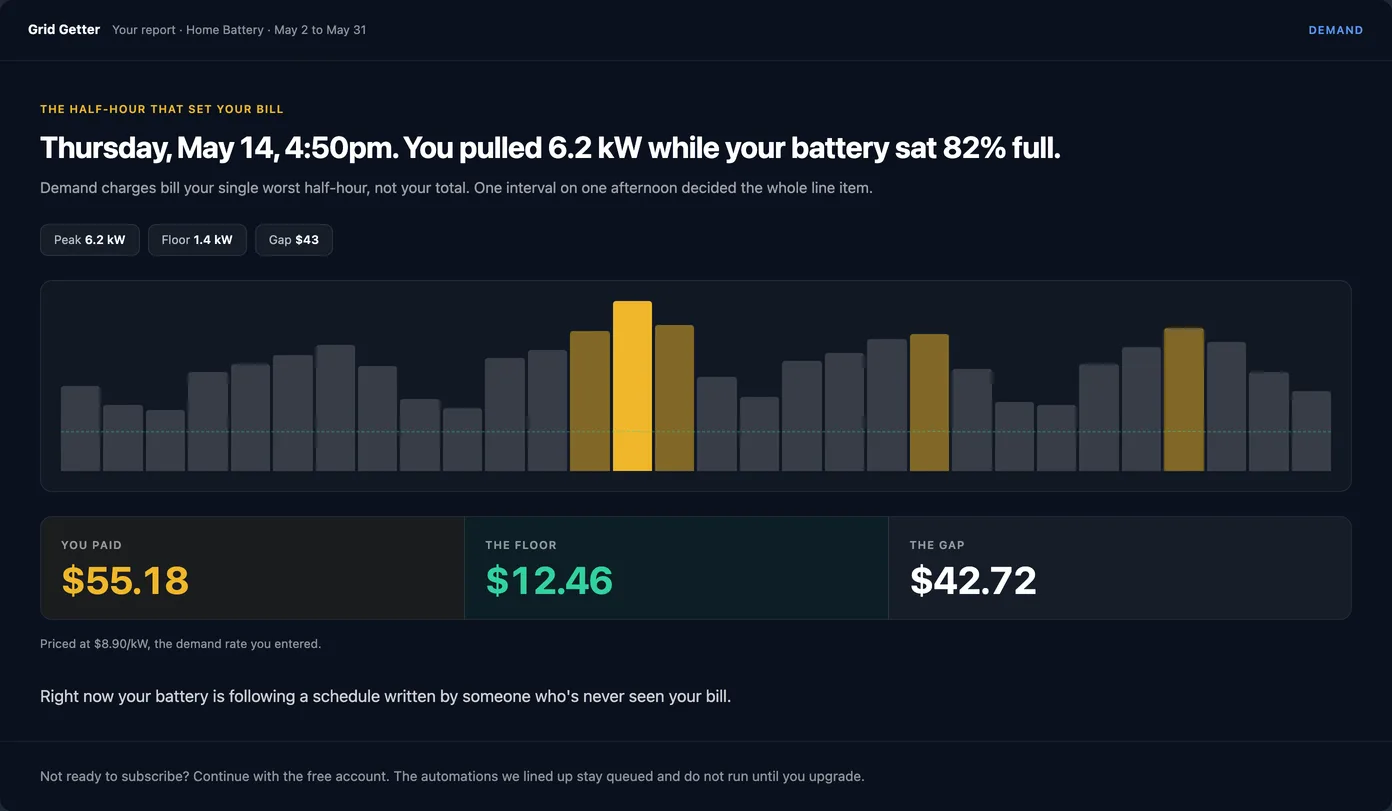
The half-hour that set your bill
A demand charge bills your single worst half-hour, so one afternoon can set the whole month. The report finds that half-hour, shows how full your battery was at the time, and works out the lowest peak it could have held you to.
- Only counts peaks inside your plan's on-peak window
- Prices the peak at your demand rate, including SRP and APS tiers
- If we don't have your demand rate, the report asks for it
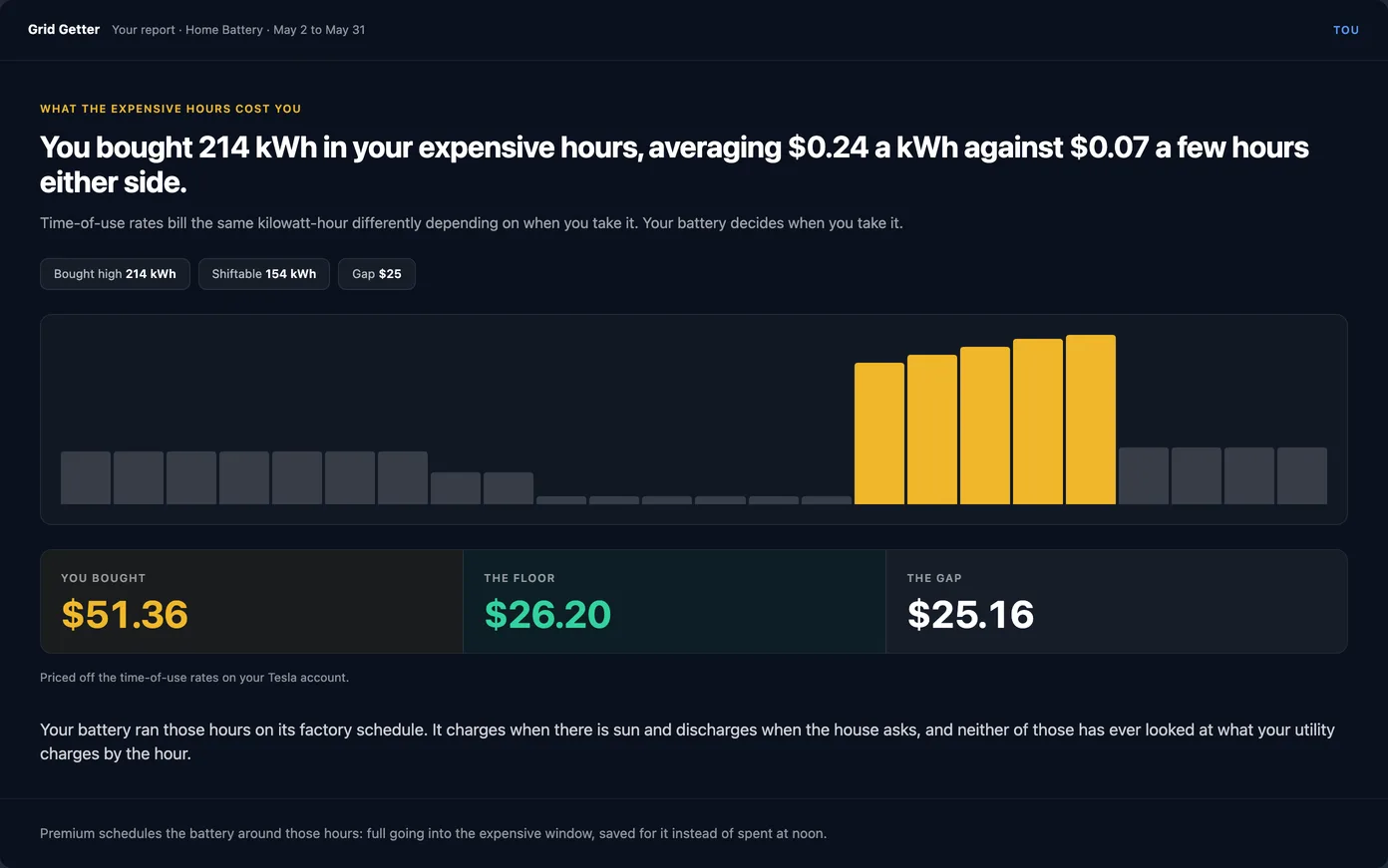
Power you bought in your expensive hours
The report adds up the kilowatt-hours you bought in your expensive hours and what they cost. Then it prices the same days with the battery covering those hours.
- "Expensive" comes from your own rates, so partial-peak and super-peak tiers count
- Uses your Powerwall's own round-trip efficiency, measured over the same 30 days
- A flat-rate plan comes back as zero
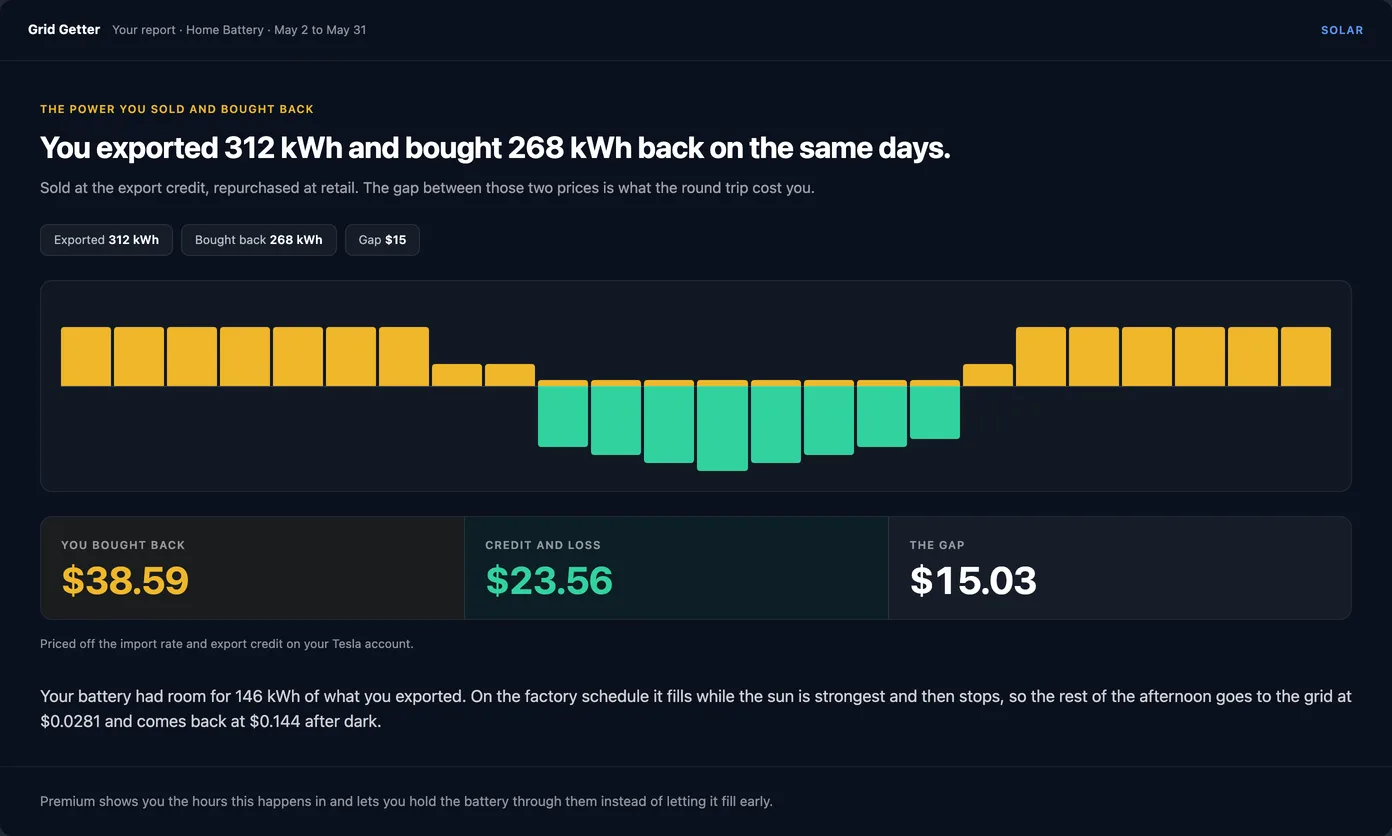
Solar you sold cheap and bought back at a higher rate
If you export solar at noon and buy power back in the evening, you pay for that round trip. The report measures how much of it your battery had room to keep, and what the round trip cost you.
- Export and buy-back are measured on the same days
- Counts the energy lost charging and discharging the battery
Each report points to the automation that fixes it
The report ends with automations sized to your own data. You read what each one would do, then decide. Nothing turns on until you say so.
DemandGuard
Watches your grid draw every 60 seconds during peak hours and uses the battery to hold your peak under a target you set. SRP and APS are set up already.
Pro Time-of-usePeak rules and TOU Optimizer
Smart Automations read your rate plan from Tesla and set up peak rules for every season in one click. TOU Optimizer charges in the cheap hours and covers the expensive ones.
Premium Solar buy-backSolar Self-Use
Keeps midday solar in the battery instead of exporting it cheap, then spends it in your most expensive evening hours.
PremiumOn the free plan you get one automation of your choice. Battery Protection is a popular one: it keeps a floor in the battery so you're covered before peak or an outage.
Connect Tesla, answer one question, read your report
Connect Tesla
Sign in with the Tesla account your Powerwall is registered to. Grid Getter reads your rate plan from Tesla, so you usually won't need to type in any rates.
Answer one question
Demand charge, time-of-use, solar buy-back, or "not sure". On SRP or APS you can pick your plan from a list.
Read your report
You see your chart, your three numbers, and the automations that would close the gap. Nothing is switched on until you say so.
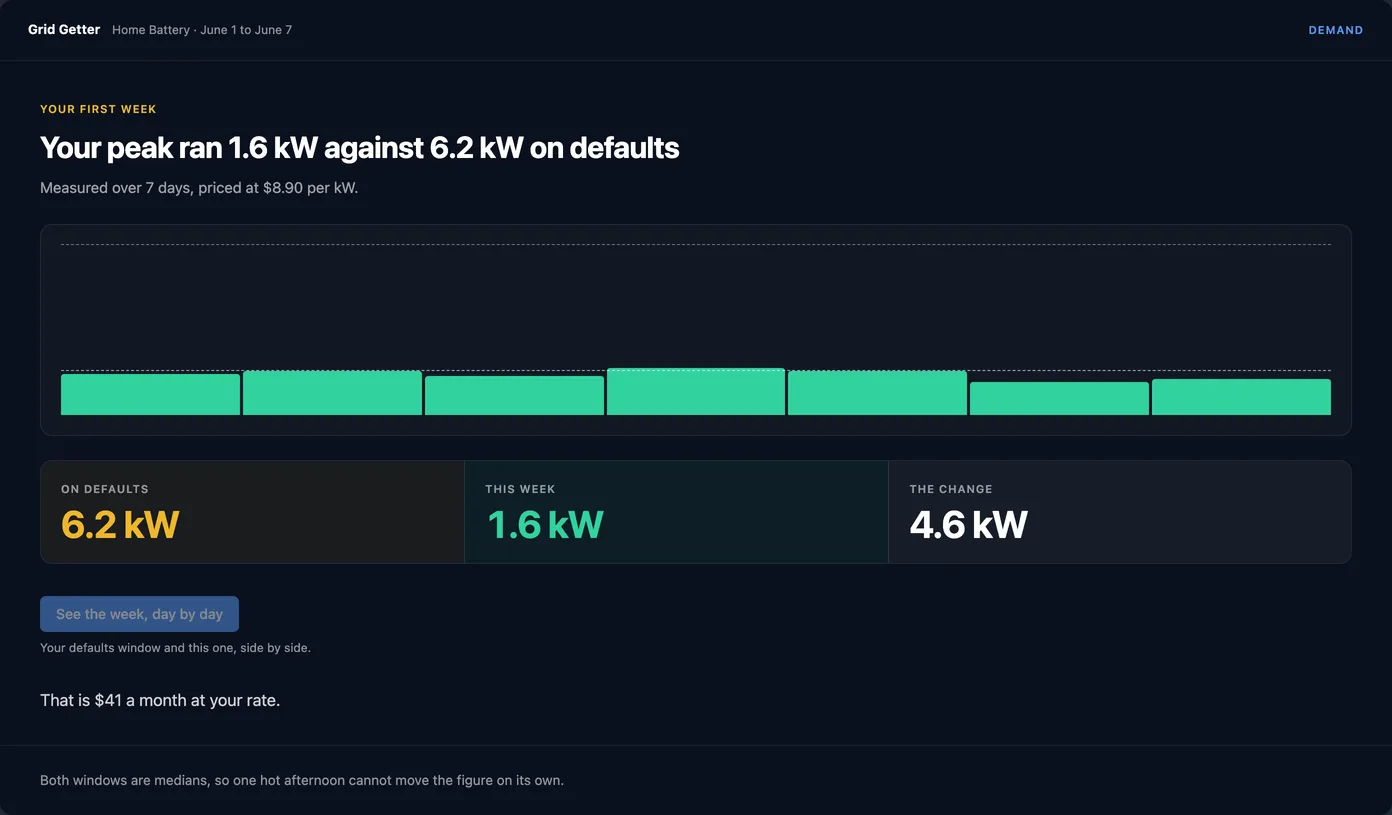
A second report checks whether anything changed
About a week after your first report, Grid Getter sends a follow-up by push, in-app and email.
- On a paid plan it's a before-and-after: your last 7 days against the 30 days your first report measured. You can see whether your automation moved the number.
- On the free plan it measures the same gap again using your last 7 days.
It won't claim anything until it has five usable days to work with.
What you need, and what it reads
A Tesla Powerwall
Powerwall 2, Powerwall+ and Powerwall 3 all work. There's nothing to install, and you don't need your installer.
Read from Tesla
Grid Getter uses the rate plan in your Tesla account, across 14 utilities. On SRP or APS you can pick your plan from a list. See the Phoenix guide.
Web, iPhone and Android
The report is in the web app and the Grid Getter mobile apps, on the free plan too.
Your Powerwall and solar data come from your Tesla account over HTTPS. We don't store your Tesla password.
Your Powerwall keeps running exactly as it was. Automations only start when you turn them on.
Remove Grid Getter under third-party access in your Tesla account, or delete your account, which revokes it too.
The privacy policy lists what's stored and for how long.
What the report assumes
Every figure comes from your Powerwall's history, priced at your plan's rates.
If your battery is already close to its floor, that's what the report says.
It leaves out taxes and fixed charges, and it has hindsight a live automation doesn't.
How we calculate your numbers lists every assumption.
About your report
Is the report really free?
Yes. It's part of the free plan. Connect your Tesla account and the report is built during setup. You don't need a card, and you don't have to buy anything to see it.
Where do the numbers come from?
From your own Powerwall. Grid Getter reads your last 30 days of battery history from Tesla and prices it at your rates. It doesn't use fleet averages or a typical home.
What if my gap is small?
Then the report says so. Plenty of homes already run close to their floor, and a small or zero gap is a real answer. We'd rather tell you that than invent a number to sell against.
Is this my actual bill?
No. It's an estimate of what the same 30 days would have cost with the battery run differently. It leaves out taxes and fixed charges, and it has hindsight a live automation doesn't. The full method is published in our docs.
How much history do I need?
A full report needs 28 days. With 3 or more days you get a partial report that fills in as the days come in. Below 3 days there isn't enough yet to measure.
Does it work on my phone?
Yes. The report is in the web app and in the Grid Getter iPhone and Android apps.
Do I need to change anything in the Tesla app?
No. Sign in with the Tesla account your Powerwall is registered to and Grid Getter reads what it needs. Reading the report doesn't change any of your Powerwall settings.
Which utilities does it work with?
Grid Getter reads the rate plan set in your Tesla account and supports 14 utilities. SRP and APS plans are built in, so you can pick yours from a list. If we don't have your demand rate, the report asks for it.
What happens after the report?
The report suggests the automations that would close your gap. On the free plan you can turn on one of them. Premium adds unlimited automations, and Pro adds DemandGuard. About a week later a second report shows whether the number moved.
See your own numbers
Connect your Powerwall and read your report. If the gap is worth closing, the report hands you the automations that close it.